A Verified Fan presale is a registration-based early sale for a tour. You sign up in advance, Ticketmaster vets your request, and only some registrants receive a code to shop before the general public. Registering is free and takes a few minutes, but it is the start of the process, not a ticket. Here is the full path from registration to checkout, and what to get ready before each stage.
We cover presales for a living, and this one trips up more fans than any other because the steps are easy but the outcome is not guaranteed. Knowing that going in makes the difference between a calm sale day and a frantic one.
TL;DR
- Verified Fan is a free registration system: you sign up during a short window, Ticketmaster checks that you are a real person, and selected fans get a unique access code.
- Registering does not guarantee a code, and a code does not guarantee tickets. Tickets are first-come, first-served while inventory lasts.
- Register for every show you could realistically attend, in order of preference, before the window closes. You usually get one registration, so make it count.
- Prepare the account, payment method and device before the sale, then join the waiting room early and do not refresh.
- If you are not selected, there is usually still a general onsale, and other presale routes may be open to you.
Table of Contents
- What a Verified Fan presale actually is
- How to register for a Verified Fan presale
- What happens after you register
- Does a code mean you get tickets?
- How codes, windows and limits work on sale day
- Prepare before the sale starts
- If you are not selected or the sale goes wrong
- Our view
- Where to go next
- FAQ
- Sources
What a Verified Fan presale actually is
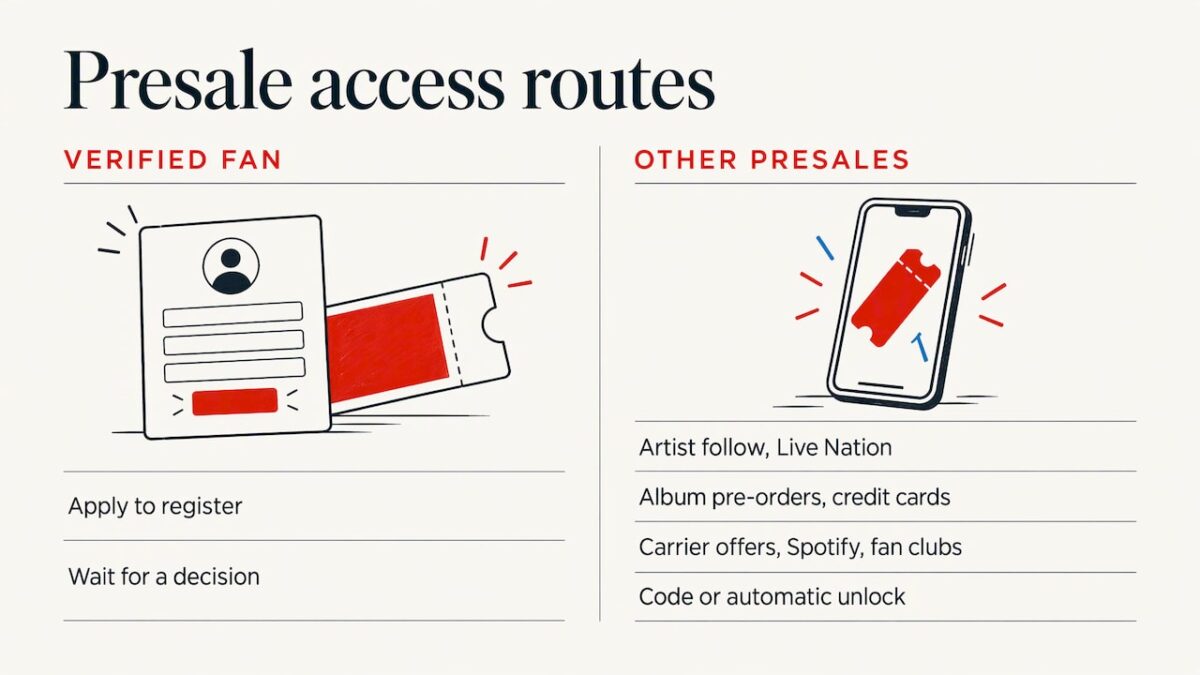
Presales give fans the chance to buy before the general sale, and Ticketmaster’s help center says access comes through either a sign-up or a code. Most presales use a code that anyone with the right card, fan club or email list can get. Verified Fan is different because it adds a screening step between you and the code.
The point is to separate fans from bots and professional resellers. After Ticketmaster’s Taylor Swift Eras Tour onsale in 2022, the company reported that fewer than 5% of tour tickets ended up on resale, compared with 20 to 30% for onsales without Verified Fan. That is the company’s own figure, but it explains why artists with huge demand choose this format.
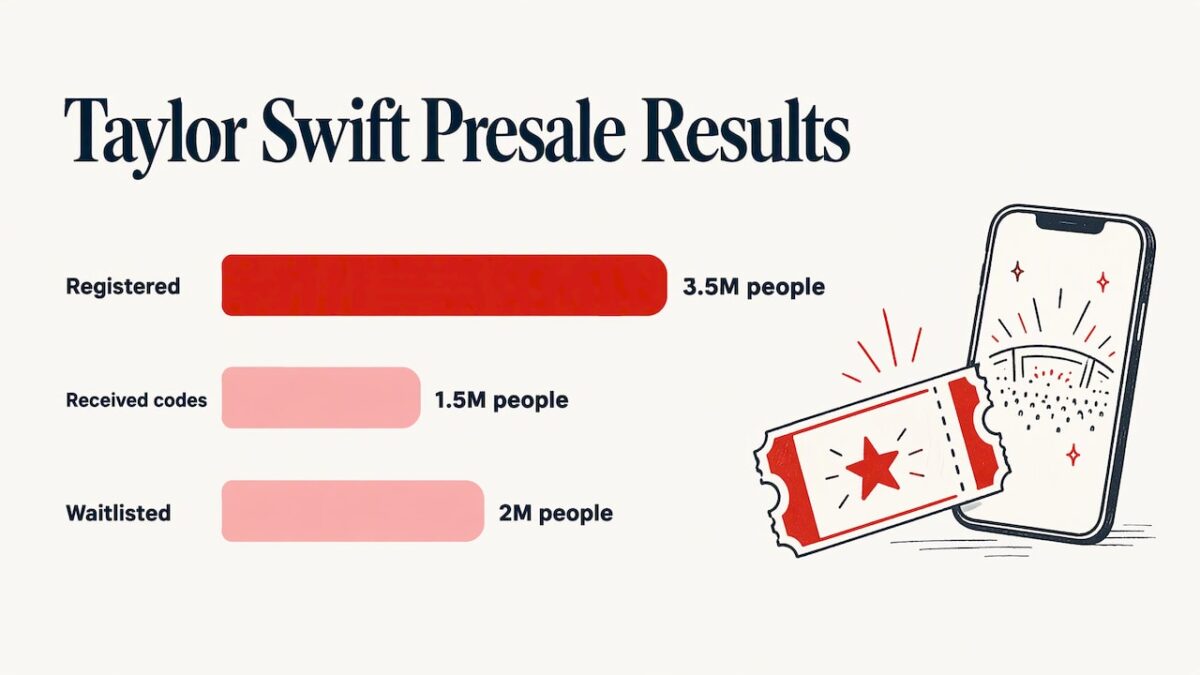
The cost of that protection is that demand often exceeds supply. For the same Taylor Swift sale, Ticketmaster said more than 3.5 million people pre-registered, about 1.5 million were sent codes and 2 million were waitlisted. Being verified is a filter, not a reservation.
How it differs from other presales
The help center lists the other common routes: a Ticketmaster presale unlocked by following an artist, Live Nation All Access, album pre-order presales, credit card presales, mobile carrier offers, Spotify presales and artist fan clubs. Most of those hand you a code or unlock the sale automatically once you qualify. Verified Fan makes you apply and wait for a decision.
If you want the whole landscape, our guide to every way into a presale, with or without a code walks through each route. This article stays on the registration-based one.
How to register for a Verified Fan presale
Registration windows are short. Ticketmaster’s blog for the 2024 Taylor Swift dates described a registration period of just a few days that closed days before the sale. Windows differ by artist, so treat the dates on the artist’s own announcement as the only schedule that counts.
Step 1: Get your account in order before the window opens
You need a Ticketmaster account, so create or update one ahead of time. Check that the email and the mobile number are ones you can access right now, because the code is delivered to them. A typo here is the most avoidable way to lose a spot.
For tours in the same series, the account you register with is the account the code is tied to. Use the account you will actually buy with.
Step 2: Find the registration page
The sign-up link lives on the artist’s Ticketmaster page and is usually repeated on the artist’s official site and social channels. Go through those official pages rather than a link someone forwarded you. Our walkthrough on how to register for artist presales step by step covers where those official links tend to appear.
Step 3: Choose your shows carefully
Ticketmaster’s blog for a Garth Brooks residency explained that fans could register for up to five shows ranked by preference, that only one registration was allowed, and that registering again simply replaced the last submission. That rule varies by event, but the lesson is general: do not submit a rushed entry and plan to fix it later.
Rank the dates you can genuinely attend. Picking only the single most popular night can cut your odds, while picking dates you cannot make leaves you holding a code you cannot use.
Step 4: Confirm and keep the confirmation
You should see a confirmation page and receive a confirmation email. Keep it. It often states how many tickets per code the sale allows. Selections can usually be edited until the deadline and are locked afterward.
A text message may ask you to enter a six-digit verification number during sign-up. That is only phone authentication. Ticketmaster has said such a code is not a purchase code, so do not save it expecting it to open the sale.
What happens after you register
Ticketmaster describes three stages: registration, verification, and then either an access code or a waitlist. During verification it vets each request to confirm it belongs to an individual, not a bot or a professional reseller.
The selection criteria are not public. The Verge reported in 2018 that a Ticketmaster executive described the system as a way to favor people likely to use their tickets rather than resell them, and that the company would not disclose how it decides because scalpers would adapt. In practice that means you cannot game it, and you do not need to. Register honestly, on one account, with real contact details.
Selected, waitlisted or neither
There are three outcomes:
- Selected: you receive a unique access code and a purchase link, typically by text the day before the sale, according to Ticketmaster’s 2024 tour blog.
- Waitlisted: you have no code yet. In a Ticketmaster blog on a K-pop tour, waitlisted fans could be texted a code at any time after the sale began if more invitations opened up. Keep your phone on.
- Not verified: you can usually still buy at the general public onsale. A 2018 Ticketmaster FAQ for a pop tour said exactly that.
Does a code mean you get tickets?
No, and Ticketmaster says so directly. Its tour blog states that access means an opportunity to join the sale, not a guarantee of purchase, and that tickets are first-come, first-served while inventory lasts. When more valid codes exist than seats, some code holders leave without tickets.
CBC News reported in 2019 that Verified Fan does not guarantee you will get to buy, nor the quality of seats. Plan around that. Treat the code as a better starting position and be ready to act fast.
How codes, windows and limits work on sale day
Here is the typical sequence, drawn from Ticketmaster’s own event blogs.
| Element | What to expect |
|---|---|
| Code delivery | Text message (and sometimes email) with a unique code and purchase link; in earlier campaigns, 2 to 4 hours before the sale; in the 2024 Eras Tour sale, the day before |
| Waiting room | Opens about 30 minutes before your assigned window in the 2024 Eras Tour sale |
| Ticket limit | Set per event; four per customer in the 2024 Eras Tour sale, six per code in one K-pop tour sale after an update from eight |
| Code use | Tied to your account, case-sensitive in some campaigns, and usable once |
| Tiers | Some tours run a members-only Verified Fan sale first, then a general Verified Fan sale only if tickets remain |
The limit is the one detail fans forget. Check your confirmation email for the number before you start choosing seats, so you are not deciding between group sizes in the middle of a queue.
Where the code goes
Where a code is required, it is entered after you reach the event page and before you pick seats, not at checkout, where promo codes belong. For some artist presales on Ticketmaster there is no code to type at all, because access is attached to your account through the link you were sent. Either way, passcodes and promo codes cannot be applied to resale tickets, per the help center.
Prepare before the sale starts
Most lost tickets are lost to avoidable problems, not bad luck. Ticketmaster’s queue help page gives the baseline: join the waiting room up to 15 minutes before the sale, use one account, one device and one browser, keep the page open without refreshing, and have a payment method ready. Once it is your turn, your spot is held for 10 minutes.
A short checklist:
- Sign in early. Make sure your account works and your billing details are current.
- Save the code message. Do not delete the text. Copy the code exactly as written, including capitals.
- Choose one device. Use a stable connection and skip extra tabs and VPNs.
- Decide in advance. Know your ticket count, your price ceiling and your section fallbacks.
- Do not refresh. Refreshing is the classic way to lose your place.
We go deeper on the queue itself in our guides to the Ticketmaster waiting room and queue tips that work and ones that get you booted. For the broader routine, see our 12 concert ticket buying tips.
If you are not selected or the sale goes wrong
A miss is not the end of the road. You have a few options, in order of ease:
- Check the general onsale. Unselected fans can usually buy when the general sale opens, though the best seats go fast.
- Look for other presale routes. Many tours have parallel presales through a card, a venue or an artist email list. Our guides to venue presale codes and Amex presale tickets explain how they work.
- Check the event page later. Held and released tickets sometimes reappear after a sale, and the queue guidance says to look back at the event page for remaining inventory.
- Know what resale is. If you go to resale, read our explainer on verified resale tickets and our guide to Ticketmaster resale and how to buy safely first.
Systems also strain under extreme demand. For the 2022 Eras Tour onsale, Ticketmaster said about 15% of interactions had problems, including code validation errors that caused some fans to lose carted tickets. If something breaks, stay calm, stay in the flow, and follow the on-screen instructions rather than opening a second window.
Our view
Verified Fan feels opaque because the decision happens out of sight. We do not think fans need a trick to deal with that. They need to understand the steps so nothing is left to chance.
Our approach is simple: register on time, on one account, with contact details that work. Then line up a second route, such as an artist sign-up or a card or venue perk, so one missed selection does not end your chances.
That is how we write every guide. We are independent from ticket vendors, we focus on the questions fans actually ask, and we say plainly that a presale gives early access, not a guarantee.
Capital
Where to go next
If Verified Fan is one of several sales you are tracking for a tour, our presale sign-up guide shows how to register for each route and get access without hunting for codes. It is built for fans who want a clear checklist, not rumors.

Want to know whether early access also saves money? Our breakdown of what you actually pay in a presale covers it, and the Ticket News Hub homepage lists the latest tour and onsale coverage.
FAQ
Is Verified Fan registration free?
Yes. You register with a Ticketmaster account and your email and phone number, and nothing is charged until you buy tickets. Be careful with anyone offering to sell you a code or a spot, since selection runs through Ticketmaster and codes are tied to the registered account.
Can I register for more than one show?
Often yes. In Ticketmaster’s Garth Brooks residency sale, fans could rank up to five shows by preference, but only one registration was allowed. The rule is set per event, so read the registration page carefully before you submit.
What if my access code does not work?
Check that you are signed in to the account you registered with, and enter the code exactly as written, since codes can be case-sensitive. Also confirm you are inside your assigned sale window. If it still fails, contact Ticketmaster Fan Support through the help center right away.
What if I miss the registration window?
You usually cannot join the Verified Fan sale late, but you can still try the general onsale, and other presales such as card, venue or artist email list offers may be open. Check the tour page for the full list of sale types and dates.
Sources
- How do presales work? – Ticketmaster Help
- Taylor Swift | The Eras Tour Onsale Explained – Ticketmaster Business
- Taylor Swift Announces New 2024 U.S. and Canadian Tour – Ticketmaster Blog
- How Ticketing Works For Garth Brooks/Plus ONE 2024 Las Vegas – Ticketmaster Blog
- How Ticketmaster’s Verified Fan program plays into fandom – The Verge
- How to Get Tickets to TOMORROW X TOGETHER U.S. TOUR – Ticketmaster Blog
- Demi Lovato & DJ Khaled 2018 Tour #VerifiedFan Presale FAQ – Ticketmaster Blog
- What to know when navigating the murky world of concert pre-sales – CBC News
- What is the queue and how do I join? – Ticketmaster Help
Leave a Reply